
Desk Setup Tips for Better Focus and Comfort
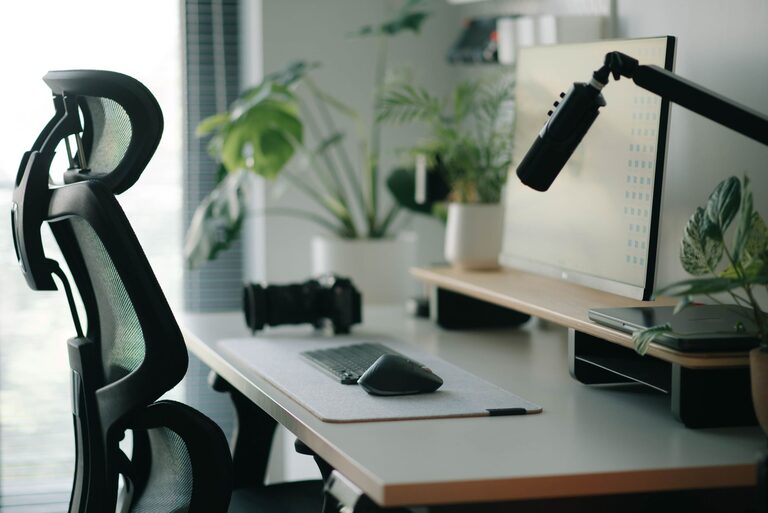
A well-designed desk setup can make work feel easier and more enjoyable. You do not need expensive equipment or a large room to create a productive space. Small changes to your layout, lighting, and daily habits can help you stay focused while making your work area more comfortable.
The goal is to build a setup that supports the way you work. Start with the basics, then adjust your space based on what feels practical and useful.
Choose the Right Location
Your desk location affects how easily you can concentrate. If possible, choose a spot with limited foot traffic and fewer visual distractions. A quiet corner of a room can work well, but even a shared space can be improved with thoughtful placement.
Consider these factors:
– Place the desk near natural light when possible.
– Avoid positioning the screen directly in front of a bright window.
– Keep the desk away from areas with frequent activity.
– Make sure you have enough room to move your chair comfortably.
– Choose a location near power outlets to reduce cable clutter.
Natural light can make a workspace feel more welcoming. However, direct sunlight on your screen can create glare, so use curtains or blinds when needed.
Set Up Your Chair and Desk
Comfort starts with your chair and desk height. Your feet should rest flat on the floor, and your knees should be positioned comfortably. If your feet do not reach the floor, a small footrest or sturdy box can provide support.
Adjust your chair so that:
– Your shoulders can remain relaxed.
– Your elbows stay near your sides.
– Your forearms rest comfortably while typing.
– Your back is supported by the chair.
– You can sit without leaning forward for long periods.
Your desk should provide enough space for your keyboard, mouse, monitor, and frequently used items. Avoid placing everything at the front edge. A little open space can make the desk feel less crowded and give you room for notes or other tasks.
If your desk height cannot be adjusted, focus on finding a chair position that allows you to work comfortably. Even simple adjustments can improve the overall feel of your setup.
Position Your Monitor Carefully
Monitor placement has a major effect on comfort and focus. Place the screen directly in front of you so you do not need to turn your head repeatedly. The top of the screen should be around eye level or slightly below it.
Keep the monitor about an arm’s length away, then adjust the distance based on text size and personal comfort. If you find yourself leaning forward, increase the text size or move the screen closer.
For a laptop, consider using a stand or a stack of sturdy books to raise the screen. Pair it with a separate keyboard and mouse so you can keep the screen at a comfortable height without raising your hands too high.
If you use two monitors, place the primary screen directly in front of you. Position the second screen beside it at a similar height and angle. This arrangement makes it easier to switch between screens without excessive movement.
Improve Your Lighting
Good lighting helps your desk feel comfortable and reduces the need to strain your eyes. Use a combination of room lighting and task lighting rather than relying on a bright screen in a dark room.
A desk lamp can provide focused light for reading, writing, or reviewing printed materials. Choose a lamp with an adjustable angle so you can direct the light where it is needed. Position it to the side of your dominant hand to reduce shadows while writing.
Avoid placing a bright lamp directly behind your monitor or directly in your line of sight. If your screen reflects the lamp or a window, adjust the screen angle or move the light source.
You can also adjust your screen brightness to match the room. A screen that is much brighter than its surroundings can feel distracting, while a screen that is too dim may be difficult to read.
Keep Essential Items Within Reach
A tidy desk can make it easier to begin tasks and stay focused. Keep frequently used items nearby, but avoid covering the entire work surface.
Create simple zones for different items:
– Place your keyboard and mouse in the main work zone.
– Keep notebooks and pens on one side of the desk.
– Store chargers and cables in a small organizer.
– Place reference materials where they are easy to access.
– Move rarely used items into a drawer or nearby shelf.
Before adding another organizer, remove items you no longer use. Decluttering first prevents storage containers from becoming another source of mess.
A small tray can hold everyday items such as keys, earbuds, or a phone. If your phone tends to interrupt your work, place it outside your immediate reach or turn off nonessential notifications.
Manage Cables and Devices
Loose cables can make a desk look untidy and may get in the way. Start by identifying which cables you use every day. Unplug and remove anything that is no longer needed.
Use simple cable management tools such as:
– Reusable cable ties
– Adhesive clips
– A cable sleeve
– A small charging station
– Labels for similar cables
Route cables along the back or underside of the desk when possible. Leave enough slack to move your devices without pulling on the connections.
Keep charging devices in one area so they are easy to find. A power strip mounted under the desk can also help keep cords off the floor, but make sure it remains easy to access.
Reduce Visual Distractions
Your surroundings can influence how easily you focus. A desk covered with unrelated items may encourage multitasking or make it harder to decide what to do first.
Try keeping only the items connected to your current task in view. Store decorative objects, extra paperwork, and spare equipment nearby rather than directly in front of you.
A simple background can also help during video calls. You do not need a perfectly styled room; a clean, organized area is usually enough. If your workspace is in a shared room, a shelf, screen, or curtain can create a clearer visual boundary.
Add Comfort Without Creating Clutter
Comfort can come from small details. A soft desk mat can make the work surface more pleasant, while a water bottle placed nearby can reduce unnecessary trips away from your desk. Choose accessories that solve a real problem rather than adding more objects.
Useful additions may include:
– A monitor stand
– A footrest
– A desk lamp
– A small plant
– A wrist rest
– A document holder
– A comfortable pair of headphones
Keep the number of accessories limited. The best setup is not the one with the most equipment; it is the one that helps you work with fewer interruptions.
Build Helpful Work Habits
Even the best desk setup works better when paired with simple habits. At the beginning of each work session, clear unnecessary items and identify your main task. This creates a consistent starting point.
Take brief breaks to stand, move around, or change your focus. You can also use a timer to remind yourself to pause between tasks. During longer work sessions, vary your position when practical instead of staying in one posture for hours.
At the end of the day, spend a few minutes resetting the desk. Return items to their usual places, remove cups or papers, and prepare the space for the next session. This small routine can make it easier to start work the following day.
Review and Adjust Your Setup
Your desk setup does not need to be perfect immediately. Use it for several days, then notice what feels inconvenient. You may need to move the monitor, change the lamp angle, remove an unused item, or place supplies closer to your main work area.
Make one change at a time so you can tell what improves the space. Over time, these small adjustments can create a desk that feels organized, comfortable, and suited to your daily routine.
Related Post
Simple Routines to Start and End Your Workday
Build calmer, more focused workdays with simple morning and evening routines that help you prepare, [...]
How to Keep Your Emails Under Control
Learn simple habits for organizing your inbox, reducing clutter, and staying on top of important [...]
How to Create a Relaxing Home Workspace
Create a calm, comfortable workspace with thoughtful furniture, soft lighting, simple organization, and personal touches [...]